 |
1. Obtain our printed and foil stamped color chart displaying 12 colors. It looks like this:
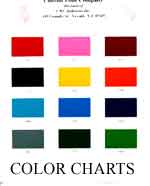 If you do not have one, please
Contact Us.
If you do not have one, please
Contact Us.
2. Compare the printed color chart to this:
| 361 | 375 | 303 |
| 775 | 161 | 204 |
| 580 | 545 | 563 |
| 887 | 675 | 603 |
3. Adjust monitor settings (contrast, brightness) to achieve as close as possible, the colors on the printed color chart.
4. Make adjustments to your video card settings to achieve as close as possible, the colors on the printed color chart. For example, in Windows 98, take the following route: Start -->Settings--> Control Panel --> Display-->Settings
a) Make sure under "colors," your setting is for 16 bit or higher.
b) After Display Settings--> Advanced. From here, navigate to change colors.
5. Repeat steps 3 and 4 if necessary.
** Before you make any adjustments, be sure you are comfortable with changing your settings as they may not be acceptable for your other computer applications.

---------------------------------------------------------------------------------------------------------------
Color reproduction over the internet has limitations because some of the following:
 |
There can be great variations in color when viewing under different uncalibrated monitors and video settings. |
|
Even monitors manufactured by the same manufacturer may have differences. |
|
Monitor and video adjustments and calibrations will vary with each user's perception. |
|
The processes utilized to create this color chart have certain color biasness or weaknesses. |
|
The range of color that the human eye can see exceed those that can be displayed on a monitor. |
|
Lighting conditions and individual perceptions can also affect color. |
|
Many colors simply cannot be accurately reproduced and viewed under any monitor and monitor and video settings. |